Show the floor plan of a listing on your own website. Buyers look around the home in 2D and 3D and stay longer on your site. How often it is opened shows in your account.
You need a free account for this.
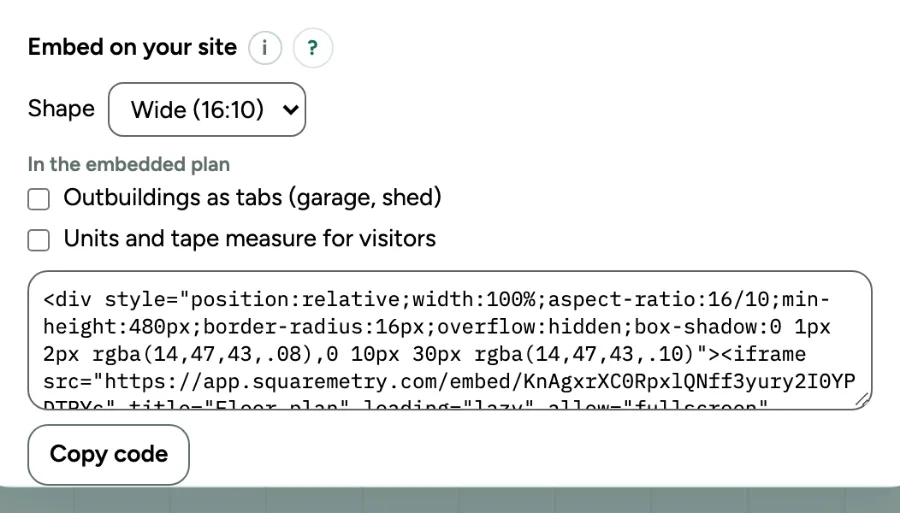
Put the floor plan on your website: step by step
1. What it is
An embedded view link: the plan with the rooms and the areas, read only, inside your own page. You keep the home in your account; nobody can change it.
2. Share
Open the home and click Share. Keep View and leave Link works on Always, so the plan stays on your site until you turn the link off. Click Make a link.
3. Embed
Under Embed on your site, pick the Shape: Wide (16:10), Classic (4:3) or Square (1:1). Click Copy code. The plan fits the width of your page and is never lower than 480 pixels on a phone. The window Your floor plan is ready has the same code, with a preview of how it looks.
4. Paste it in your site
Paste the code in an HTML or embed block in WordPress, Wix, Squarespace or the site builder of your listing software. Publish the page.
5. The small line under the plan
The code holds a small link to Squaremetry under the plan. With Pro, Team or an unlocked home you can uncheck Show the link to Squaremetry before you copy. Code that is already on your site does not change: remove the line under the plan on your site if you do not want it.
6. When the link stops
If you pick 30 days or a date, the dialog says when the link stops. After that, or when you turn the link off, your site shows a calm card This floor plan is no longer available instead of the plan, with your logo if you have one.
Messages you may see
- This floor plan is no longer available