Ask in plain words, like How do I make a dormer? The AI help knows Squaremetry exactly. A visible AI mouse points at the right button, step by step, and Do it for me shows what will change before anything changes.
This needs Pro.
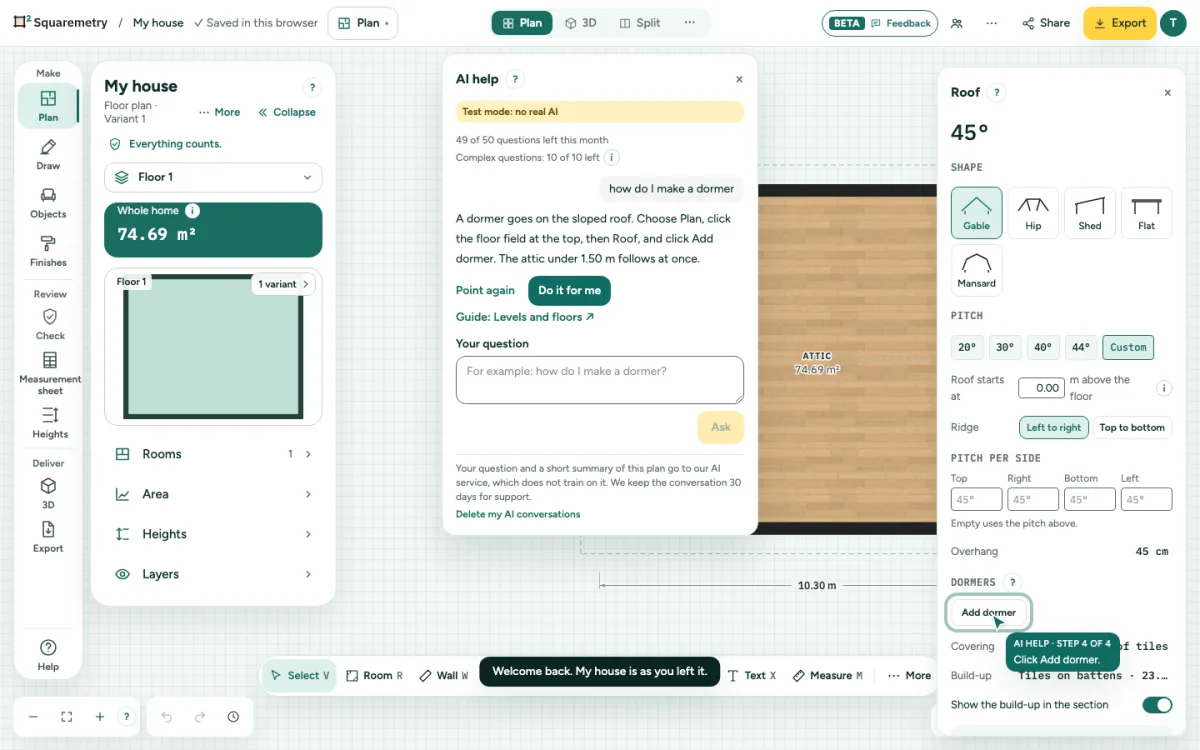
AI help: ask how it works, or let it do it: step by step
1. Open it
Click the small mouse button at the bottom right, choose AI help at the top under ?, or search Ask the AI help with ⌘K.
2. Ask
Type your question in English, Dutch, German, Spanish, French, Italian or Portuguese and click Ask. The answer appears while it is written, in a few short sentences. Stop ends it; closing the window with × or Escape does the same. If an answer stops halfway, the text so far stays grey with The answer was not finished., and Try again asks the same question once more. Trying again does not cost an extra question: the answer that broke off no longer counts (once per question, within 15 minutes). The same goes when the AI took too long or something went wrong after the first words.
3. Follow the AI mouse
The AI mouse moves to the button, panel or spot on the drawing and lights it up softly: Click Plan here. You click yourself; after each click it goes to the next step. Point again shows the steps once more.
4. Do it for me
When you ask for a change, such as Put a 2 by 3 m bathroom here, click Do it for me. You first see what changes and the area before and after. Apply puts it in your plan as one step, and Done says so; Undo takes it back. Does a lock or another tab with this plan stop it, then nothing changes and you see why. When something would be removed, it says so in red and asks Yes, remove it.
5. When the AI is not sure
It says so honestly and shows the guide that fits. Ask our team to look along later sends your question to us; we reply by email.
6. Your questions this month
Pro includes 50 questions a month and Team 250 for the whole team. The count at the top of the window shows how many questions are left this month. Used them all? The window says so as soon as you open it, with 100 more questions for $5 in place of the question field. Click it, tick the box and pay. The questions count only in the month you buy them; what is left lapses on the 1st. A month starts at midnight on the 1st, Dutch time. A question counts as soon as the answer starts, also when you stop it halfway; if no answer came, it does not count.
7. Complex questions
Of those questions, 10 complex questions a month with Pro and 50 with Team go to our strongest model, 10 more with each pack. A complex question is long and has several steps or asks why. After that our fast model answers the same question, with the same knowledge, and the window says Answered by our fast model. The line Complex questions under the count shows how many are left; the (i) next to it explains it. Asking the same question about the same plan again within a day gives the same answer for free: it does not count. It does need AI help on your plan, like a new question.
8. Try it without Pro
With a new account you get 3 free questions, once per account and email address; Do it for me counts as a question, an answer that fails on our side does not. The window shows how many are left. They are not given with a disposable email address or when they were already used on this device. Without an account, sign in first: it is free and takes one step.
Shortcuts
- ⌘K
- Search tools, actions and help
On Windows and Linux, use Ctrl where the Mac has ⌘.
Messages you may see
- The AI help is part of Pro and Team.
- The AI help is resting for now. The guides are always there.
- I did not remove anything: you did not ask for that.