Type what should change on a floor, like make the kitchen open, add a study or make bedroom 2 bigger. You see the floor now and with the change, with the difference in area by the standard, before anything changes.
This needs Pro.
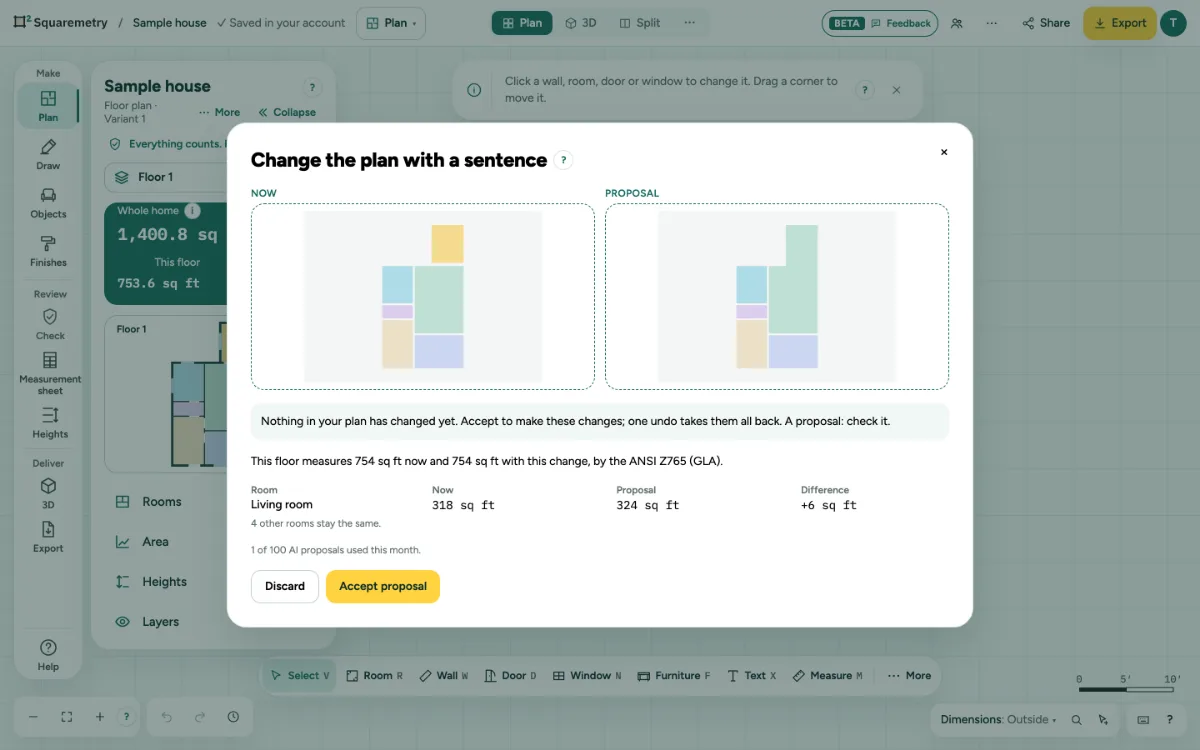
Change the plan with a sentence (AI): step by step
1. Open it
Click … at the top right, open File and choose Change the plan with a sentence (AI)…, or search it with ⌘K. It works on the floor you have open.
2. Say what to change
Type What should change? and click Make a proposal. AI only picks changes from a fixed list: open up two rooms, make a room bigger or smaller, split off a new room, or rename a room. Our own geometry moves the walls.
3. Check the difference
You see Now and Proposal side by side, and per room the area now, with the change and the difference, measured by the standard of your plan. A note says when an outside wall moves or a room gets too small.
4. Accept or discard
Accept proposal makes the change in one step; one undo (⌘Z) takes it all back. Discard changes nothing; your sentence stays. Only what the proposal changes is changed: what someone else drew in the meantime stays. If someone changed the same part, nothing changes and a message says so.
Shortcuts
- ⌘Z
- Undo
On Windows and Linux, use Ctrl where the Mac has ⌘.
Messages you may see
- This floor has no rooms yet. Draw or detect the walls first; then you can change them with a sentence.
- That does not fit in Living room. Nothing was changed. Ask for a smaller room.
- To do this, an outside wall moves out: the house gets bigger.
- You have used all 100 AI proposals of your subscription this month. Nothing was changed. You can draw the plan yourself, or try again next month.
- Someone changed the same part of this floor while you were checking. Nothing was changed. Make the proposal again.
- Construction is locked, so the proposal was not applied. Unlock it and choose Accept proposal again.
- A fixed size stops this proposal, so it was not applied. Nothing was changed.
- You are a reviewer in this office: you look, you do not change anything. AI proposals are made by a drafter, an admin or the owner. Ask the norm and the AI help are open to you.