Sort your homes into folders, give them colour labels and a status, and duplicate a home with or without furniture.
You need a free account for this.
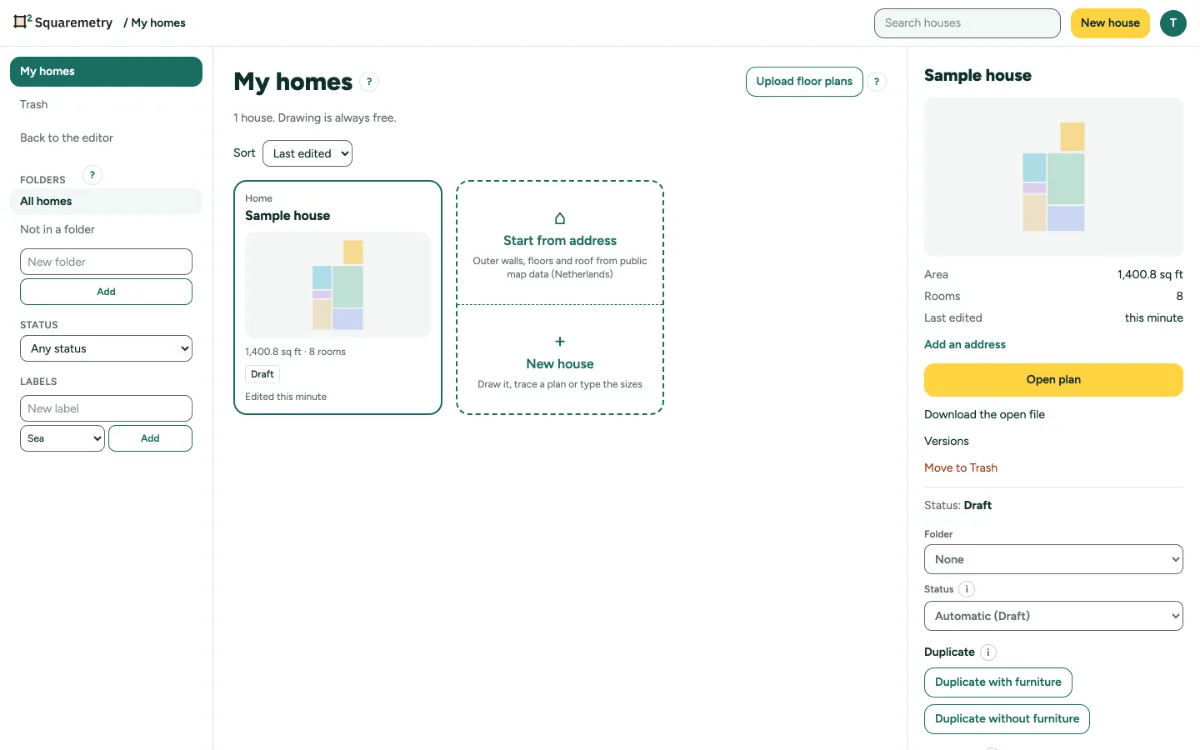
Folders, labels, status and duplicates: step by step
1. Folders and labels
In My homes, type a New folder or a New label with a Colour, and click Add. They are shared in the workspace.
2. Set them on a home
In the details of a home, set the Folder, the Status and the labels. Status is Draft, Sent or Paid, set by itself or by you.
3. Filter
Click All homes, Not in a folder, a folder, a status or a label.
4. Duplicate
In the details, click Duplicate with furniture or Duplicate without furniture. The copy is a new home with its own history.
Messages you may see
- This name is already used.
- You review in this office: you can look at everything, but not change it.