Share your personal invitation link. When someone makes an account through it and pays for Pro, Team or a home, you both get one month of Pro, 14 days after that payment.
You need a free account for this.
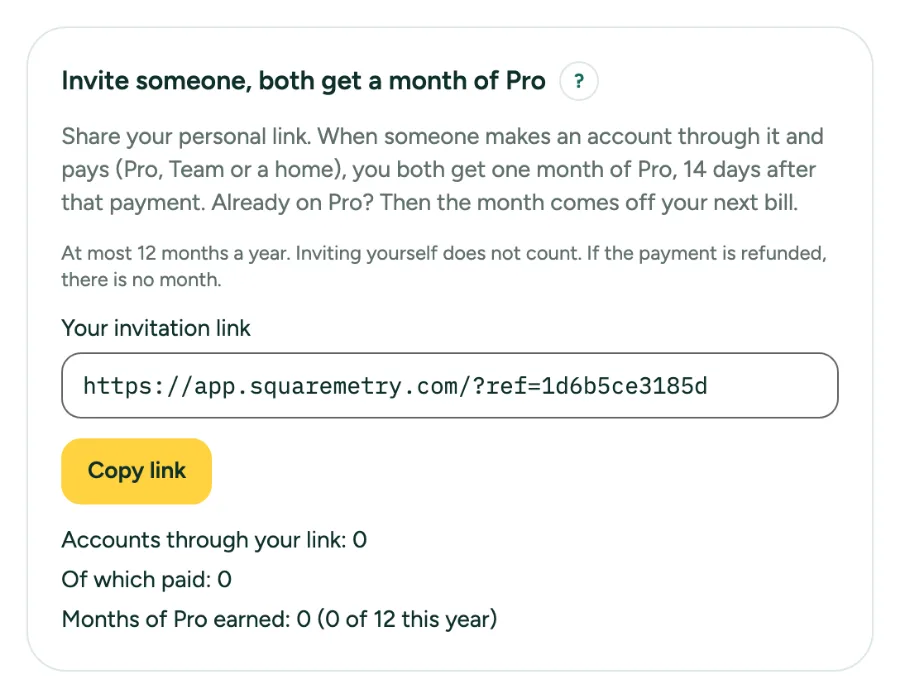
Invite someone and both get a month of Pro: step by step
1. Find your link
Open Settings, tab Plan and billing. Under Invite someone, both get a month of Pro you see Your invitation link. After a download, the card that says your file is ready has Copy invitation link too.
2. Share it
Click Copy link and send the link to someone who could use it. The link holds a random code, never your name or e-mail address.
3. They sign up and pay
The other person opens the link, makes an account and pays once: Pro, Team or a home. Then we wait 14 days, the time in which a payment can be withdrawn or refunded.
4. You both get a month of Pro
After the 14 days you both get one month of Pro. Without a subscription that is Pro for a month; a second month adds on after the first. Already on Pro or Team? Then one month of Pro comes off your next bill, as a discount, never as credit.
5. See what it gave
Under your link you see how many accounts came through it, how many paid, how many are still waiting for the 14 days, how many months of Pro you earned and until when your Pro from invitations runs. You never see who they are.
Messages you may see
- Link copied.
- Copy failed. Select the link and copy it yourself.