For the Dutch standard: the measurement sheet per floor, a sum that must close, and a measurement report as PDF.
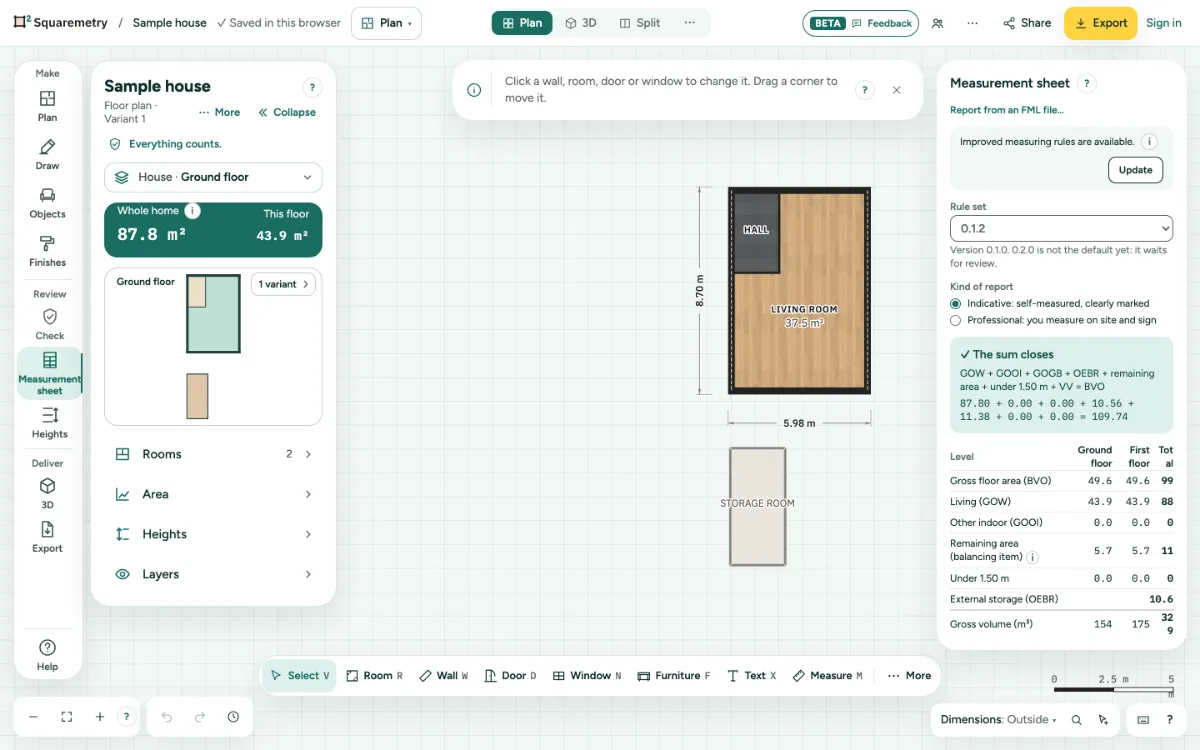
1. Open it
Open Survey with ⌥2 or the editor menu, and choose the tab Measurement sheet. A Dutch plan opens on it. If the plan is not Dutch, click Use the Dutch measuring instruction.
2. Check the sheet
Per floor you see every area part. A green line says The sum closes; a red one shows where it does not. Under What needs a look, Show jumps to the spot.
3. Gross volume
The gross volume of each level follows the roof as you drew it: every wing of an L, T or U shape, a pitch per side and every dormer, up to the top of the roof build-up. A top level without a roof shows a dot, and the report waits for the roof.
4. Confirm the walls
Mark each interior wall as load-bearing or not. It does not change the GO, but it does change the NEN 2580 number and the Ag.
5. Make the report
Choose Indicative or Professional, fill in the Report details and click Make the measurement report (PDF). The report is in Dutch.
6. Address from your account
Is this home in your account with an address (My homes), then street and number, postcode and place are filled in for you. You can change them; Use the address of the home puts it back.
7. Professional report and FML
The indicative report stays free, with the small mark. The professional report and the FML are part of Pro, Team or a home with the measurement report ($7.50, 30 days). A home you unlocked for $5 adds the report for the difference ($2.50). During the beta it is free within your 10 homes a month; in Pro or Team the home counts as one of the new homes of the month. The line under the buttons says what applies to this home.
8. Made on our server
Our server makes the professional report and the FML, from the version in your account, after it checks what applies to this home. The editor first saves your last change. Without a connection, or if the home changed in another tab, it says so and nothing is counted. The indicative report is made in your browser, also offline.
9. Honest about the rules
The cover, the footer and the way of working name the rule set with its id, version and status. As long as the rules are a proposal, a professional report is a concept, never final.
10. For Funda
Package for Funda (ZIP) holds the FML, a PNG per level and the report when it is ready. It is also in Export, under For Funda. Funda has not yet confirmed that it accepts FML files from other programs.
Shortcuts
- ⌥2
- Editor Survey
Messages you may see
- The measuring instruction is Dutch. Choose that standard to use this mode.
- The sum does not close
- Not yet: fill in the missing fields
- The professional report and the FML are part of Pro, Team or a home with the measurement report.
- This home has no address in your account yet. Add it in My homes, or type it here.
- No connection to our server. The professional report and the FML are made there. Try again when you are online; nothing was counted.
- This home was changed somewhere else in the meantime. Open the latest version and try again; nothing was counted.