See your own home in 3D the way it is built: foundation, structure, installations, envelope and finish. Pull the levels and layers apart, and see the installations through the walls.
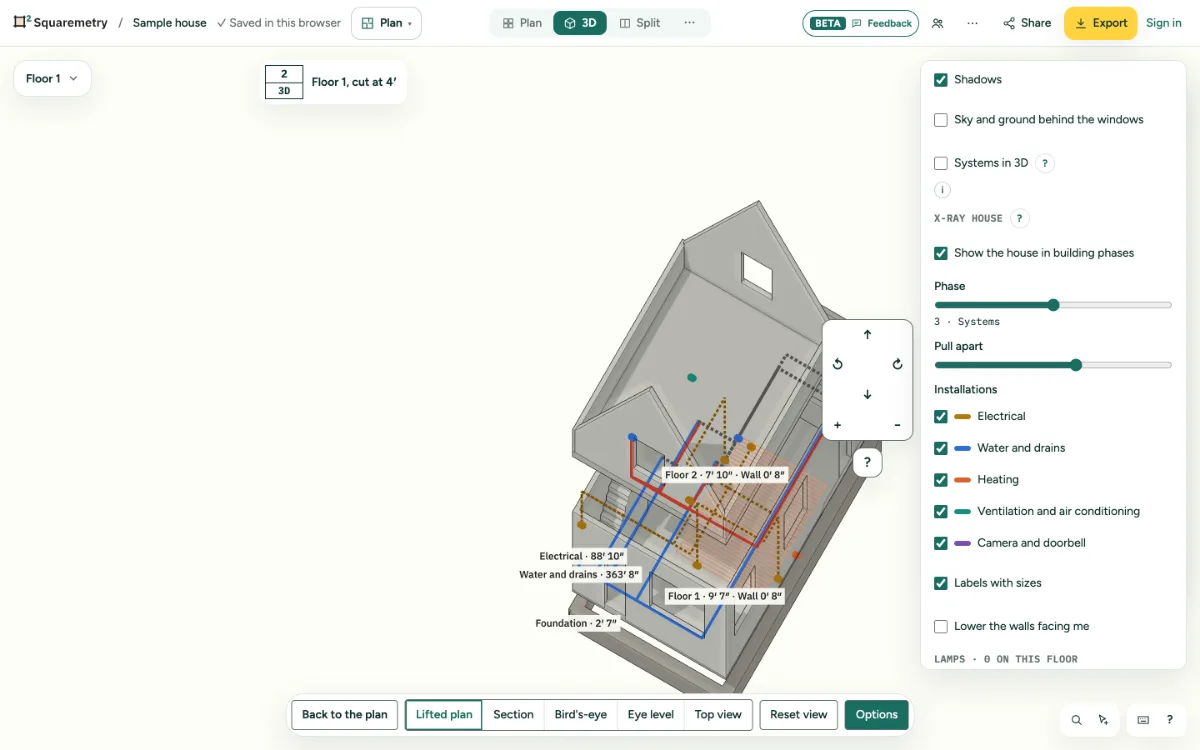
X-ray house: the building phases in 3D: step by step
1. Turn it on
Open 3D and its options. Under X-ray house, tick Show the house in building phases. 3D switches to the bird view. From Systems, Layers has See it in 3D (X-ray).
2. Phases
Drag Phase from 1 to 5: Foundation (strips under the outer and load-bearing walls, 0.8 m deep), Structure (outer, party and load-bearing walls and the floor slabs in concrete grey), Systems (pipes, cables and symbols in the colour of their trade), Envelope (facades with windows and doors, and the roof) and Finish (inner walls, floors and furniture). Each phase shows everything before it.
3. Pull apart
Drag Pull apart to lift every level and every layer: the foundation drops, the installations lift a little, the envelope lifts the most. Back to 0 puts the house together.
4. Installations
Tick or untick Electrical, Water and drains, Heating, or Ventilation and air conditioning. The coloured bar is the legend. Installations stay visible through the walls, like an X-ray.
5. Labels
Labels with sizes show the depth of the foundation, the thickness of the outer wall, the height of each level and, per trade, the length on that level.
6. Systems in the normal 3D
Above the X-ray house, tick Systems in 3D to see symbols as small blocks at their height and pipes and cables at their level in the normal 3D, with the walls standing. Behind a wall they stay hidden. Tick or untick each trade. In Systems, Layers has Show in 3D too, with the trades that are on there. The X-ray house and this layer take turns: turning one on turns the other off.