Draw a stair from the bottom step. Choose straight, L, U or spiral, and cut the opening in the floor above in one click.
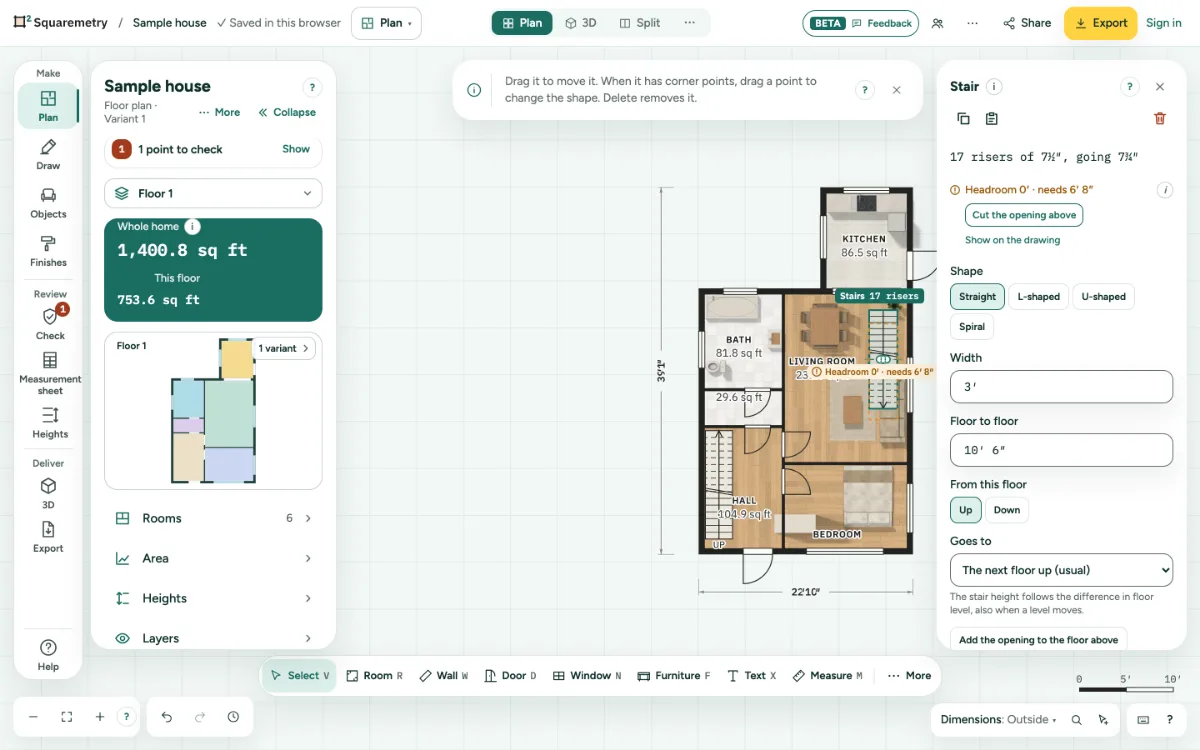
Add a stair: step by step
1. Draw it
Press S. The Stair card on the right shows the Shape (Straight, L-shaped, U-shaped or Spiral), the Width and Up or Down for the stair you draw next; on the top floor it goes down by itself. Click where the stair starts at the bottom, then where the first flight ends. Click on the face of a wall and the stair stands against it, not in the wall; in a corner its side stays clear of the other wall too. Drawn at an angle, or as a spiral, the whole stair moves away from the wall until no edge is in it; if it cannot fit, a message says so. New walls still join a wall on its centre line. A new stair rises to the next floor of the same building, by level height: in a garage that is the garage floor above, and a split level next to the house does not count. Copy a stair and paste it on another floor, and it has no target: it is a manual stair with its own height.
2. Shape and size
In the Stair card, pick Straight, L-shaped, U-shaped or Spiral, the Width and Floor to floor.
3. Turn it
Turn a stair like furniture: click Rotate in the card or press Q for a quarter turn, ⌘← ⌘→ for 5° or ⇧⌘← ⇧⌘→ for 15°, or type the direction in Rotation (0 is up the plan, 90 to the right). It turns around the middle of its first flight; the opening above turns with it. Undo brings it back in one step.
4. The opening above
Click Add the opening to the floor above. Its size is the outline of the stair, and it moves along when you move the stair or change its size. Move the opening itself or drag one of its corners, and it is your own: it no longer follows. Delete the stair and the opening stays as a loose opening. Too little headroom shows as a problem. A stair with no floor where it goes, up or down, shows in Check as This stair goes nowhere: add the floor, or turn the stair the other way.
Shortcuts
- S
- Stair
Messages you may see
- There is no level above yet.
- Too wide: the room is 2′8″ across here.
- Headroom 6′3″ · needs 6′8″
- This stair goes nowhere