Let the editor propose sockets, switches, lights, taps, radiators and vents for every room of a level, from the room type. You see the proposal first, and accept or discard it.
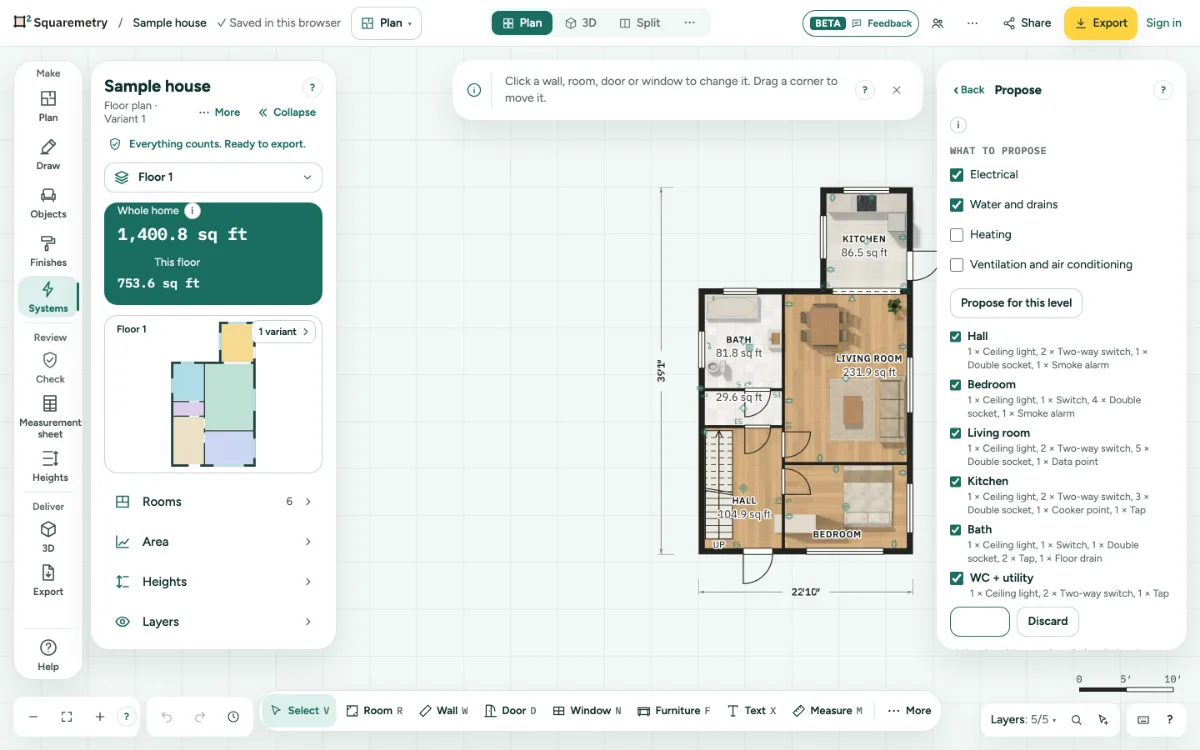
1. Room types first
Give each room its type: click the room and open Type in the room panel on the left (Living, Bedroom, Kitchen, Bathroom, Hall...). The proposal follows the type and the size of the room.
2. Choose what to propose
In Systems, open a trade, then Propose. Tick the trades you want: Electrical, Water and drains, Heating, or Ventilation and air conditioning.
3. Propose
Click Propose for this level. The proposal shows faintly on the plan, and per room in the list: lights in the middle, a switch at each door (two doors: two-way switches on the same lights), sockets along the walls, taps, a floor drain in wet rooms, a radiator under each window and an extract vent in wet rooms.
4. Keep or leave rooms
Untick a room to leave it out. If you change the plan, the proposal is out of date: propose again.
5. Accept or discard
Accept puts everything in the plan in one step; ⌘Z takes it all away again. Discard leaves the plan as it was. After accepting, move or change each symbol like any other.
Shortcuts
- ⌥3
- Editor Remodel, tab Systems
- ⌘Z
- Undo
On Windows and Linux, use Ctrl where the Mac has ⌘.
Messages you may see
- Draw rooms first; the proposal follows the room types.
- The plan changed. Propose again.
- This level has 300 symbols, the most it can hold.