Under More formats in Export you get the house as a 3D model for other programs, or as an IFC file for BIM with the area of every room under your standard.
Free as a small PNG with a watermark. In full: unlock the home (your first home is free) or take Pro.
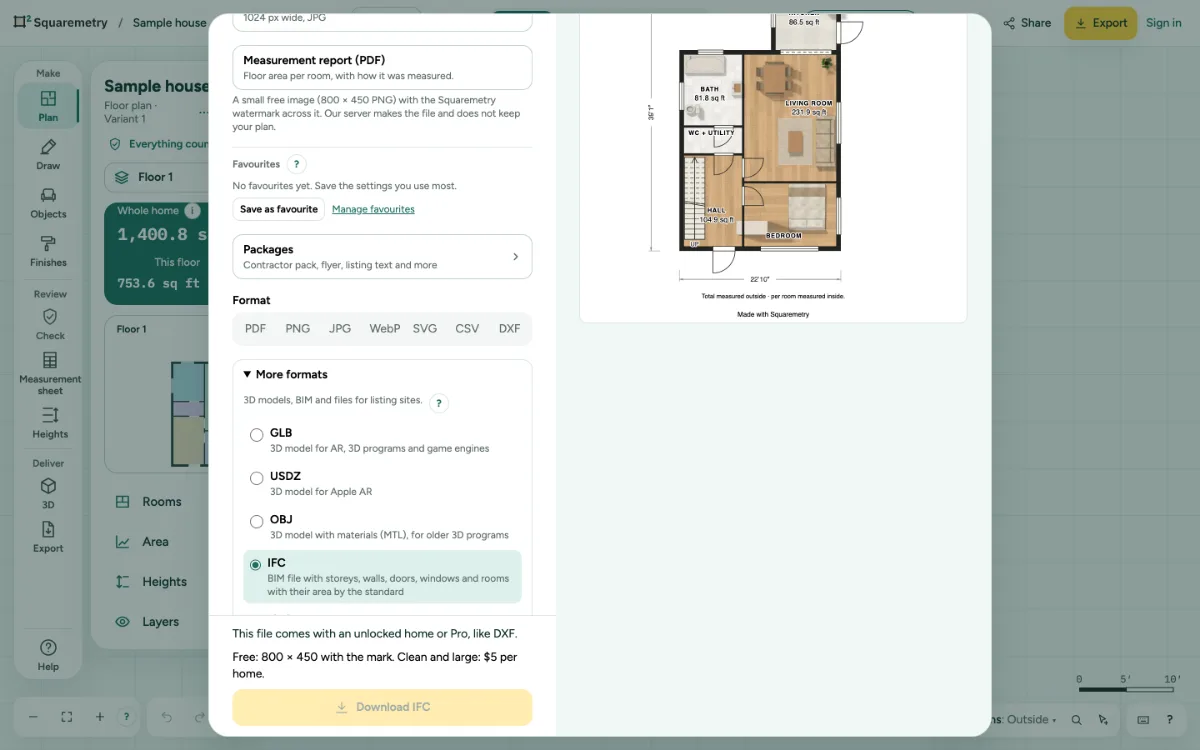
Export a 3D model or a BIM file (GLB, USDZ, OBJ, IFC): step by step
1. Open More formats
Click Export, then open More formats under Format. It stays closed until you need it.
2. Pick a format
GLB is a 3D model for AR, 3D programs and game engines. USDZ is for Apple AR. OBJ comes with its materials (MTL) in one ZIP, for older 3D programs. IFC is the BIM file.
3. Every kind on its own layer
In GLB and OBJ every level and kind (walls, doors and windows, stairs, furniture, roof, floors) is a separate part with its own name, in meters with Y up. No name, address or place goes in the file.
4. IFC with the area by the standard
The IFC 4 file has the site, the building (and each outbuilding), a storey per floor, walls, doors and windows in their openings, stairs, furniture and the roof, each on its own layer. Every room is an IfcSpace with its net area and, in the property set Squaremetry_MeasuredArea, the area that counts under your standard with the rule set and its version.
5. Download
Click the yellow button. The 3D panel has the same GLB, USDZ and OBJ under 3D model.
Messages you may see
- This file comes with an unlocked home or Pro, like DXF.
- Sign in and keep this home in your account first.
- Draw a room first. There is nothing to export yet.