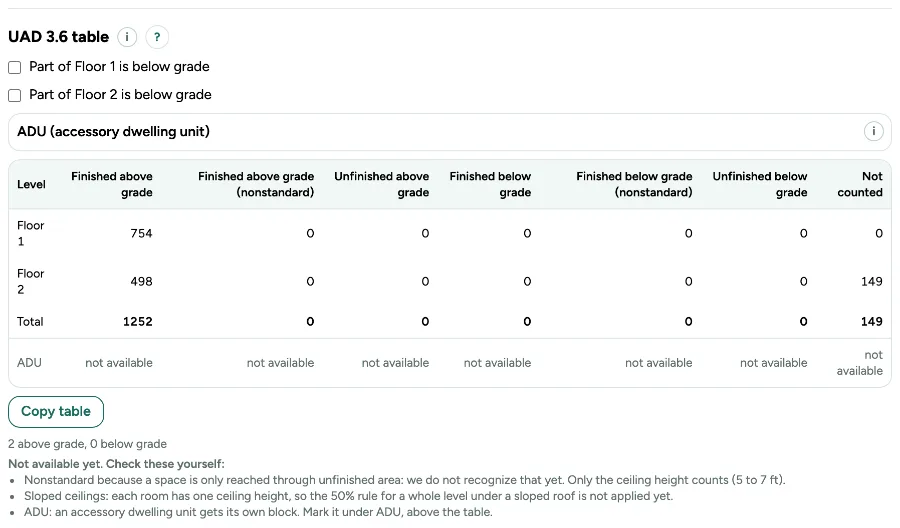
For appraisers in the US: Export shows the area per level in the six UAD 3.6 boxes, in whole square feet, from the ANSI Z765 numbers.
1. Use the US standard
The table only shows when the plan is measured to ANSI Z765. A level that is partly below the ground goes in the below grade boxes; the floor above a basement stays above grade.
2. Open Export
The UAD 3.6 table is in the Export window, under the options.
3. Copy it
Click Copy table and paste it into your appraisal software or a spreadsheet. The CSV export also holds the table.
4. Mark an ADU
Open ADU (accessory dwelling unit) above the table and tick the outbuilding or the rooms that form it. The ADU gets its own rows and ADU total; the home no longer counts it. Without an ADU the row says not available, never 0.
5. Footprint in tenths of a foot
In Measure, open More for professionals, then Footprint for appraisers. Walk around the house and type each side with its direction, like R 32.5, D 24, L 12.3. You see at once whether it closes and how many sq ft it is; Draw the footprint puts the exterior walls with their outside on your sizes, on an empty floor.
6. Sketch and declarations
Footprint sketch (PDF) gives every level with its sides in tenths of a foot, the area calculation and the GLA. The report and the CSV get a block of declarations for ANSI Z765-2021 in our own words: what was measured how, what is reported apart, and the rule set with version and status.
Messages you may see
- Copied. Paste it into your appraisal software or a spreadsheet.
- Copying did not work in this browser. Select the table and copy it yourself.
- This floor already has walls. Open an empty floor to draw the footprint.
- The footprint is for plans measured under ANSI Z765 in feet. Choose that standard first.