Choose several walls, rooms or pieces of furniture at once. Duplicate, turn, mirror, or copy them to another level.
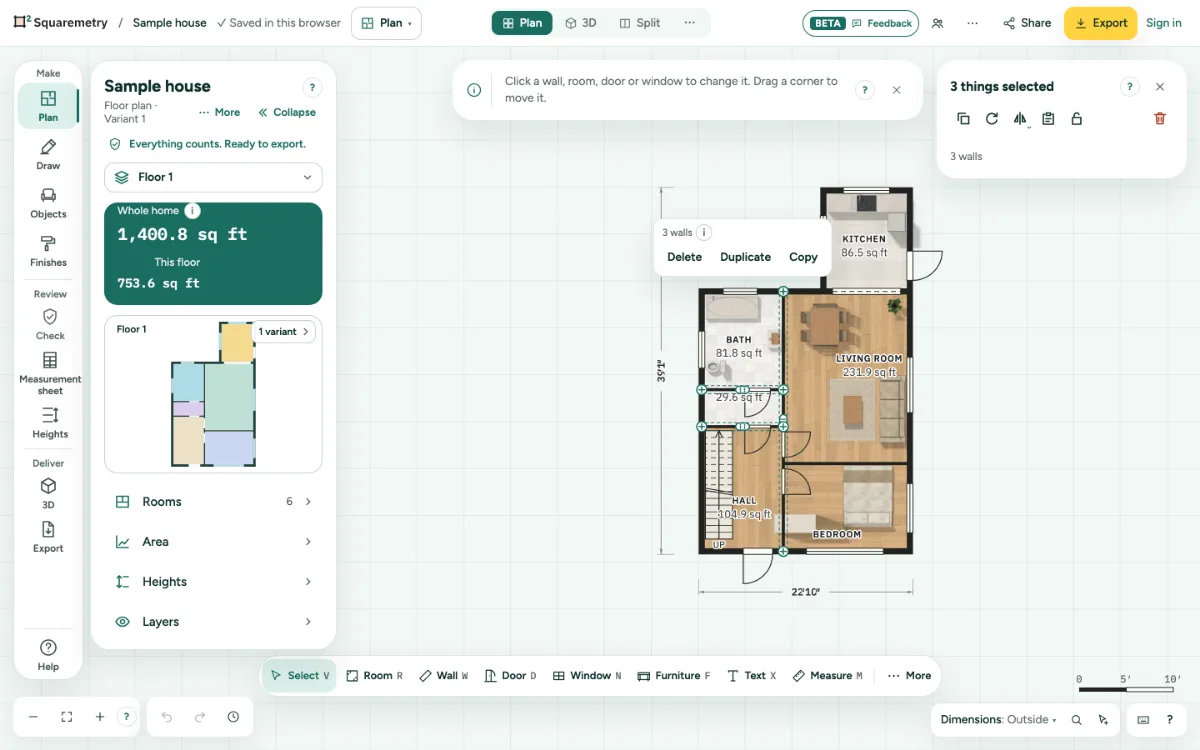
1. Choose more than one
With Select, hold Shift and click, or hold Shift and drag a box around what you want. ⌘A selects everything on this level.
2. Move them together
Drag one of them; the rest moves along.
3. Lock sizes at once
Under Selection, click Lock sizes or Unlock sizes for all chosen walls and rooms in one step. On a phone, press and hold a wall or room, tap Select more, then tap the others; tap an empty spot to stop.
4. Duplicate, turn, mirror
Under Selection, click Duplicate (⌘D), Turn 90°, Mirror sideways or Mirror up-down. Doors, windows and text on them come along.
5. Copy to another level
Click Copy (⌘C), switch level and click Paste (⌘V). The walls land in the same place and join the walls that are there.
Shortcuts
- ⌘A
- Select all
- ⌘D
- Duplicate what is chosen
- ⌘C
- Copy walls
- ⌘V
- Paste walls on this level
On Windows and Linux, use Ctrl where the Mac has ⌘.
Messages you may see
- Tap more walls or rooms. Tap an empty spot to stop.
- Copy walls first: pick them and press Copy.
- Walls joined to walls outside the selection come loose. Undo puts them back.