Skip to the content
FIRST HOME FREE 30 days of exports without the mark, no card
Modelling in 3D

Model: look around, slide and fit

Guide: Model: look around, slide and fit · · 1 min read

Turn round your model, slide the view and zoom to the mouse. Any tool keeps working while you look.
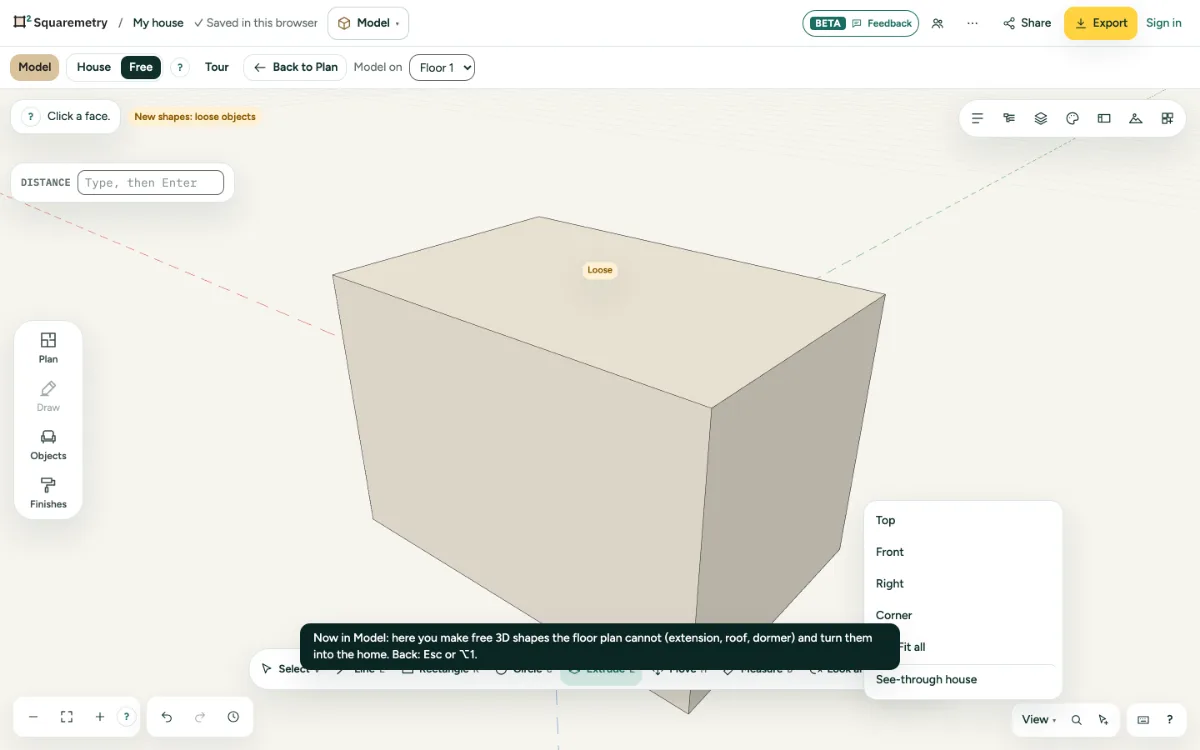
A block seen from a corner, with Top, Front, Right and Corner at the top.

Model: look around, slide and fit: step by step

  1. 1. With the mouse

    Drag with the middle button to look around and with the right button to slide. The wheel zooms to the mouse.

  2. 2. With a tool

    Press Q to look around or H to slide with the left button.

  3. 3. Set views

    Open View at the bottom right for Top, Front, Right and Corner: they put the camera straight; Z or Fit all shows everything.

Shortcuts

Q
Model: look around
H
Model: slide
Z
Model: fit all in view

Related

Still stuck?

Questions about “Model: look around, slide and fit”? Send us a message and tell us what you tried. We will help you from there.

Start with your first floor plan

Your first home is free for 30 days, no card needed. After that: $5 per home, or Pro from $24 a month.

Start for free

or sign in with a code by email